 patricia.codes
Smart Bank Tab Deposit
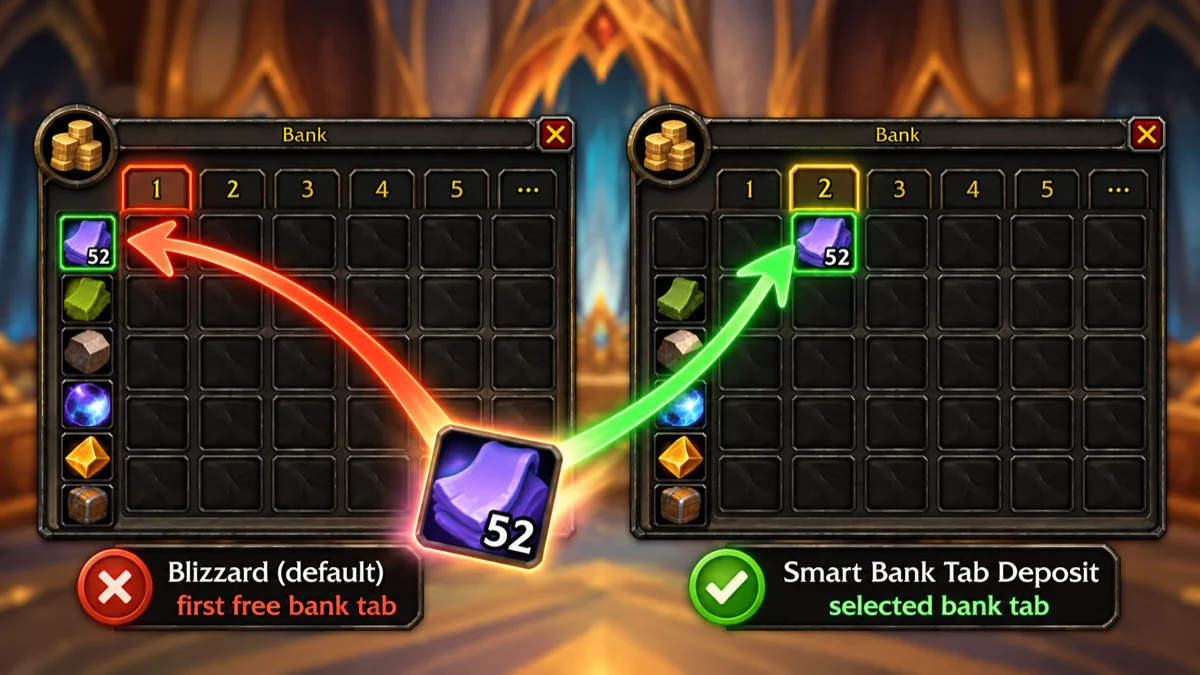

Since the bank got tabs, right-clicking an item at the bank ignores the tab you have open: the item goes onto a stack of that item in any tab, or into the first free slot in any tab. You open your herb tab, right-click your herbs, and they end up in tab 1 between your old gear, because an old stack happened to be there. Smart Bank Tab Deposit fixes that: right-click an item and it goes into the tab you have open. Existing stacks in that tab are topped up first, and tab assignments are respected: an item that belongs somewhere else goes where Blizzard would put it, so your sorted tabs stay sorted. There are no settings and no new window: it just fixes where Blizzard puts your items. The addon automatically uses your WoW client language and is localized in English, German, Spanish, French, Italian, Portuguese (Brazil), and Russian.
Features
Into the selected tab
- Right-click deposits go into the bank tab you have open
- Works for the character bank and the Warband Bank
- Stacks in the open tab — an existing stack there is topped up, only the rest takes a new slot
- A stack in another tab no longer pulls the item away
Respects your bank setup
- Tab assignments are respected — if the open tab is assigned to item types (e.g. Profession Goods and Reagents), only matching items go in
- Which item counts as what is checked against Blizzard’s “Clean Up Bank”
- Two tabs for similar items (e.g. current and old reagents)? Open the one you want, and the items go there
- Everything else (potions, gear, lockboxes) is deposited by Blizzard’s own rules
- Tab full? A short message, and Blizzard deposits the item as usual
- Items that can’t go into the Warband Bank, and items that would lose their refund, are left to Blizzard’s own messages
Nothing else changes
- Shift / Ctrl-clicks, dragging, using items away from the bank, and combat work exactly as before
- Works with Blizzard’s bags, and with Bagnon’s bags when you use Blizzard’s bank window
- /sbtd debug turns debug messages on or off, showing each move in chat (helpful for bug reports)
Localization
- Automatically uses your World of Warcraft client language
- Supported languages: English, German, Spanish, French, Italian, Portuguese (Brazil), and Russian
Screenshots
Support
Want to provide feedback?
Enjoying this project? Support my work.